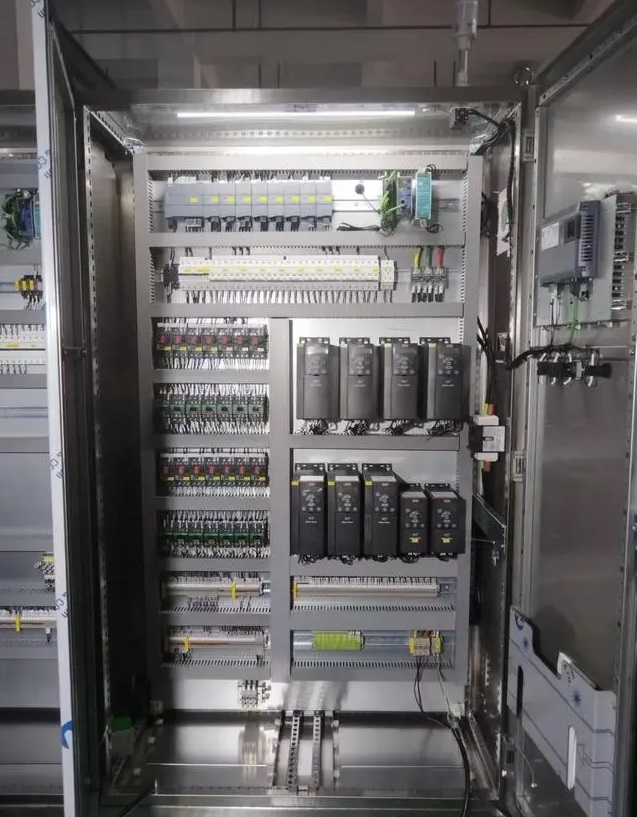
Appearance inspection
Doors and vents: Check regularly whether the doors can be closed and sealed properly, and make sure that the vents are not blocked. Good ventilation can prevent the temperature in the control cabinet from being too high. For example, check once a month whether the hinges of the cabinet doors are flexible and whether the dust screens of the vents need to be cleaned or replaced.
Indicator light status: Observe the indicator lights on the control cabinet (power indicator, operation indicator, fault indicator, etc.), and make a preliminary judgment on whether the equipment is operating normally by the status of the indicator lights. If the fault indicator light is found to be on, find the cause of the fault in time.
Terminal check: Check whether the terminal is loose or discolored (this may be a sign of overheating). Loose terminals may cause signal interruption or short circuit, while discolored terminals may generate excessive heat due to poor contact. It is recommended to check and tighten the terminals every quarter with appropriate tools (such as screwdrivers, torque wrenches).
Cleaning work
Internal cleaning: Clean the inside of the control cabinet regularly to remove dust and debris. You can use a clean compressed air can or a soft brush for cleaning. The key cleaning objects are the heat sink and vents of the PLC module, because dust accumulation in these places will affect the heat dissipation effect. For industrial environments with more dust, it may be necessary to clean it once a month; in general environments, it can be cleaned once every 3-6 months.
External cleaning: Clean the outside of the control cabinet, including the cabinet surface and operation panel. Wipe with a clean damp cloth and avoid using corrosive cleaning agents to prevent damage to the coating and electrical components on the cabinet surface.
Electrical component inspection
PLC module inspection: Check whether the various components on the PLC module, such as the CPU module, I/O module, etc., have signs of damage, such as burn marks, loose components, etc. Check whether the connection between the modules is firm and whether the communication cable is normal. Such a comprehensive inspection can be carried out once a year.
Other component inspection: For other electrical components in the control cabinet, such as relays, contactors, fuses, etc., check their working status. Check whether the contacts of the relays and contactors are worn, adhered, etc., and whether the fuse fuse is blown. Replace components that may fail in a timely manner according to the service life of the components and the working environment.
Backup and Update
Program backup: Back up PLC programs and parameter settings regularly. The backup files can be stored on external storage devices (such as USB flash drives, mobile hard drives) or cloud servers. The backup frequency can be determined based on the frequency of program modifications. For example, if the program is frequently modified, back it up once a week; if the program is relatively stable, back it up once a month.
Firmware Update: Pay attention to firmware update information released by PLC manufacturers. PLC firmware updates may fix software vulnerabilities or enhance system performance. Before updating, make sure to back up existing programs and parameters, and perform update tests in a test environment first, and then apply them to the actual system after confirmation. Perform firmware updates in a timely manner according to the manufacturer’s recommendations and actual operating conditions.
Environmental Monitoring and Control
Temperature and Humidity Monitoring: Install temperature and humidity sensors in the control cabinet to monitor temperature and humidity in real time. Ensure that the temperature remains within the normal operating range of the PLC and other electrical components (usually 0 – 55℃), and the humidity should generally be between 10% – 90% relative humidity. If it exceeds this range, the environmental conditions can be adjusted by installing air conditioners, dehumidifiers and other equipment.
Check of protective measures: For control cabinets working in special environments such as corrosive gases or electromagnetic interference, check whether the protective measures are effective. For example, check whether the gas filter needs to replace the filter element, whether the shielding layer of the shielded cable is intact, etc.